Run your marine service shop from check-in to paid invoice.

MarineOps keeps every boat, engine and job in one place — hull ID and engine hours at the dock, estimates your customers approve from their phone, warranty claims, winterization, parts and payments.

No signup — click straight into a working marine service shop. Or take the tour ↓

SEE IT IN ACTION

Click Through a Real Shop Day

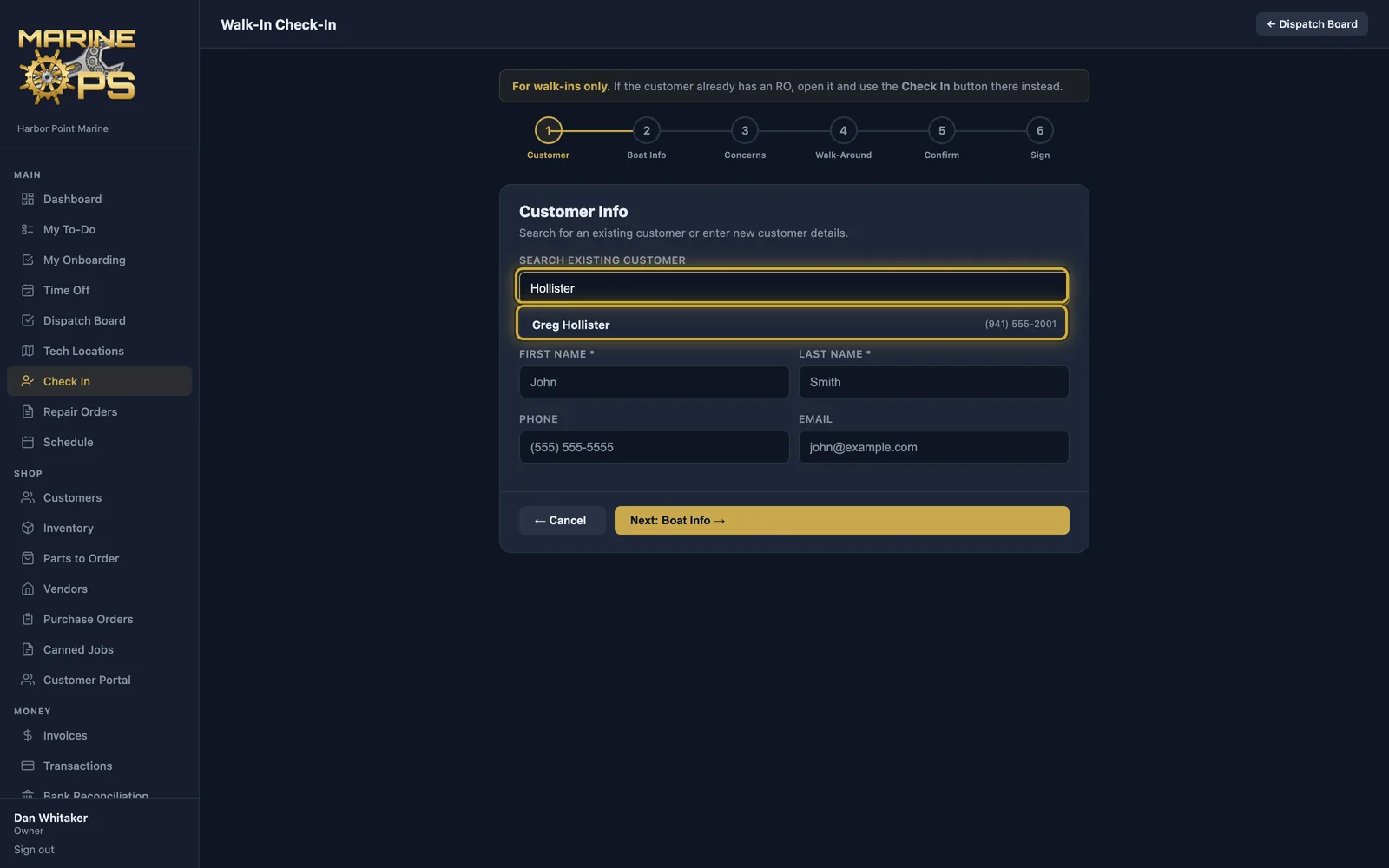
Real screens from MarineOps — pick a step, or open the live demo and click around yourself.
▶ Try it yourself — live demo
getmarineops.com
Find the customer, or add a new one

Everything a marine shop does all day

Built on the same system that runs a busy service center every day, with the words, checklists and service intervals boats need.

⚓

Check-in built for boats

Hull ID, engine hours, engine make and model, trailer, walk-around photos and the customer's signature — on a tablet at the dock.

🧾

Estimates they approve from their phone

Send the estimate by text or email. Customers approve or decline each job, and you see it the moment they do.

🛡️

Warranty & insurance claims

Mark who pays for each job — customer, extended warranty, manufacturer or insurance — and email the claim with photos for pre-authorization.

❄️

Winterization & storage

Seasonal checklists, recurring service reminders by engine hours or months, and a storage status for every boat on the lot.

🔧

Tech app for the dock

Techs clock in, see their jobs, take photos and write notes from their phone — iPhone and Android.

📦

Parts, POs & inventory

Impellers, filters, anodes — track stock, order from vendors, and parts land on the job automatically.

💳

Invoices & payments

Card, tap to pay and bank transfer. Customers pay online from the invoice; deposits and split billing included.

📊

QuickBooks & reports

Paid invoices sync to QuickBooks Online. Sales, tech productivity, parts and profit reports built in.

🌐

Customer portal

Owners see their boats, service history, photos and invoices, and message the shop any time.

How a job moves through MarineOps

The same simple path every time, so nothing sits waiting on a sticky note.

1. Check inHull ID, engine hours, photos and the customer's concerns — signed on the tablet.
2. Estimate & approveBuild the estimate, text it, and the customer approves each job from their phone.
3. Do the workTechs see their jobs, add photos and notes; parts come off inventory.
4. Invoice & get paidOne click to invoice, paid online or at the counter, synced to QuickBooks.

SWITCHING IS EASY

Up and Running in an Afternoon

No setup fee, no sales call, no consultant. You can be writing real repair orders the same day.

1
Start your free trial
Pick a plan, enter your shop name and you're in. 14 days free, no credit card.
2
Bring your data over
Import your customers and their boats, your parts and your labor guide from a spreadsheet — or pull customers and parts straight from QuickBooks Online.
3
Set up your shop
Add your labor rate, taxes and techs, connect Square or Stripe for payments, and write your first repair order.

Step-by-step guides: First-day setup · Importing your data · QuickBooks
Stuck on your spreadsheet? Send us a message and we'll help you get it in.

DO THE MATH

What Is MarineOps Worth to Your Shop?

Move the sliders to match your shop. The assumptions are right there — change them if you think they're off.

Your shop

Assumptions (edit them)

Estimated value each month
$0
Billable labor captured
Office time saved
Your plan:
▶ Try the Live Demo See what's in each plan ↓

An estimate, not a promise — your results depend on your shop. The math: repair orders × minutes ÷ 60 × rate.

Simple monthly pricing

Every plan includes unlimited repair orders, the customer portal and online payments. No contract.

🧭
Not sure which plan? Answer four quick questions.
1. How many people will use MarineOps, including you?
2. Do you need a dispatch board, boat check-in with key tags, or a time clock?
3. Do you run a parts room — purchase orders, receiving, canned jobs, inspections?
4. Do you want your books (bank feeds) and HR / hiring inside MarineOps too?

Solo

$79/month
For the owner-operator mobile marine tech.
  • Repair Orders & Estimates (Unlimited)
  • Digital Estimate Approvals
  • Invoicing, Online Pay & Tap to Pay (Square)
  • Customer Portal
  • Road Calls & Navigation
  • Scheduling
  • Parts List & Price Book
  • Photo Documentation
  • Tech Mobile App for iPhone & Android
  • Basic Reports
  • Import & Export Your Data
  • Just You — Owner Only
  • Photo Storage: 1 Year
Start Free Trial

Starter

$149/month
For small shops with a few service bays.
  • Everything in Solo, plus:
  • Dispatch Board
  • Boat Check-In & Key Tags
  • Time Clock & Timesheets
  • Google Review Requests
  • Up to 5 Staff
  • Photo Storage: 1 Year
Start Free Trial
Most popular

Pro

$249/month
For busy yards with a parts room and a service writer.
  • Everything in Starter, plus:
  • Purchasing (POs, Vendors, Receiving, Parts to Order)
  • Canned Jobs, Smart Recipes & Labor Guide
  • Digital Inspections
  • Full Reports (P&L, Balance Sheet, CPA)
  • QuickBooks Online Sync
  • Bay Board
  • Expenses
  • Up to 10 Staff
  • Photo Storage: 2 Years
Start Free Trial

Elite

$399/month
Run the whole business — books, bank feeds and HR included.
  • Everything in Pro, plus:
  • Bank Feeds & Reconciliation
  • HR, Hiring & Onboarding
  • Service Reminders
  • Advanced Analytics
  • Priority Support
  • Up to 20 Staff
  • Photo Storage: 5 Years
Start Free Trial

Questions shops ask

Anything else? Send us a message below.

Does it track engine hours instead of miles?

Yes. MarineOps records engine hours at check-in and on every repair order, and service reminders can run on engine hours, months, or both.

Can I keep trailers with the boat?

Yes. A boat can have its trailer on the same record, and you can also check in a trailer on its own for bearings, lights or brakes.

Does it handle Yamaha, Mercury and other warranty work?

Yes. Split any repair order between customer pay and warranty, track the authorization number and deductible, and email the claim with photos.

Do my customers need to download anything?

No. Estimates, approvals, invoices and the customer portal all open in a normal web browser.

Can I bring my customers over from another system?

Yes. Import customers, boats and parts from a spreadsheet, or pull them in from QuickBooks Online.

Is there a contract?

No. Pay month to month and cancel any time. You can export all of your data whenever you like.

Ready to run your marine service shop like a pro?

Start your free 14-day trial today. No setup fee. No credit card required.

Get in touch

We read every message and reply within one business day.