 MarineOps
 Help Center › Road Calls & Scheduling
The Dispatch Board
See every job by status and move work across the board.
Included in: Starter plan and up
The Dispatch Board shows every open repair order as a card in a column for its status — from Checked In through Ready Pickup. It's the "whiteboard" view of the shop: what's waiting on you, what's waiting on the customer, what's waiting on parts, and what's in the bays.
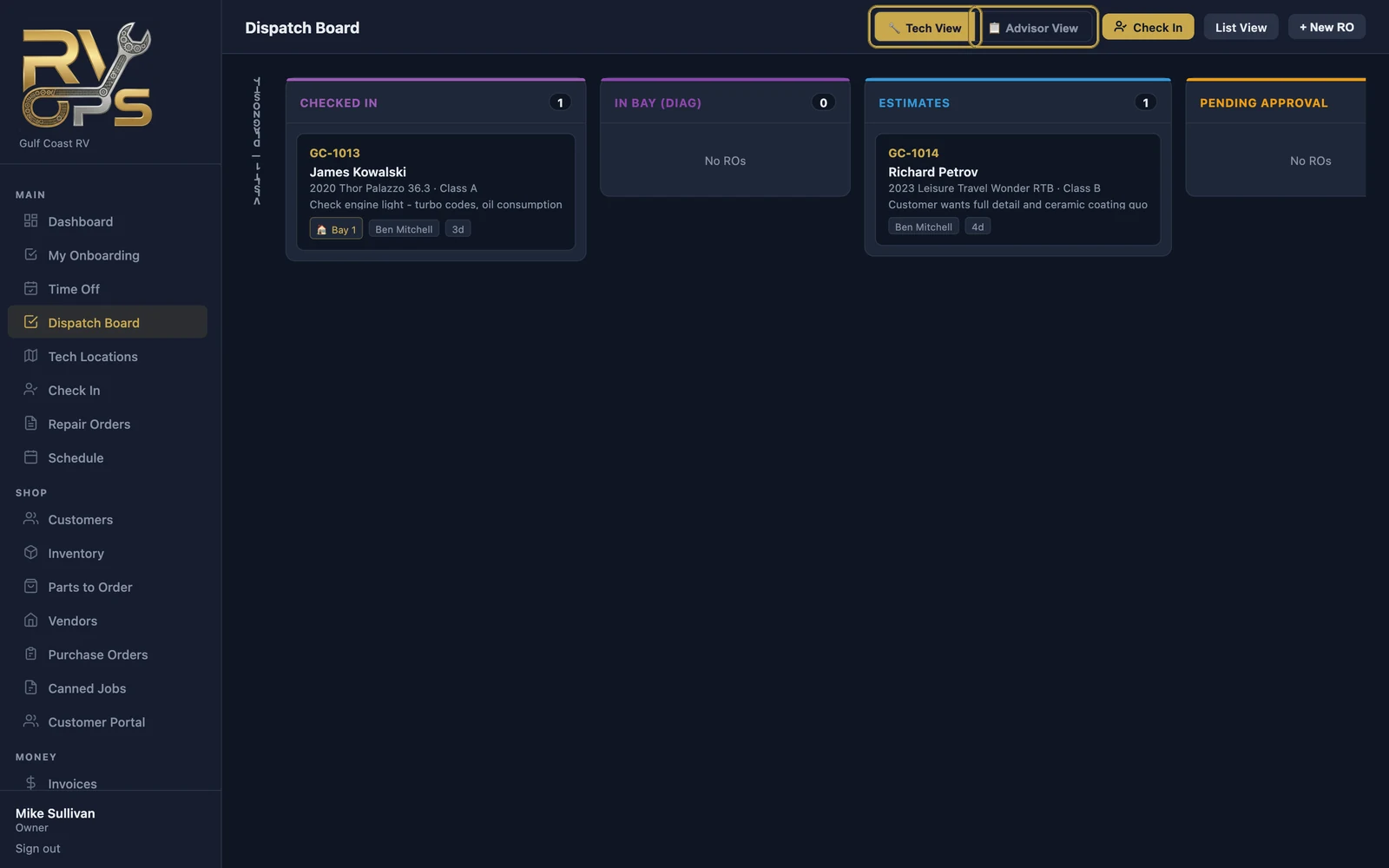
How the columns are grouped
- Visit 1 — Diagnostic: Checked In, In Bay (Diag), Estimates, Pending Approval, Approved
- Between visits: Parts on Order
- Visit 2 — Repair: Ready for Bay, In Progress, Sublet Out, Ready Pickup
Each column header shows how many ROs are in it, so bottlenecks jump out — five ROs sitting in Pending Approval means somebody needs to make some calls.
Move work along
Drag a card to another column to change its status, or click a card to open the RO.
Two views
- 📋 Advisor View — every RO in the shop, for service writers and managers.
- 🔧 Tech View — focused on the work in the bays.
The buttons along the top also take you to Check In, the List View (the regular Repair Orders list) and + New RO.
Open Board View from the Repair Orders page to get here quickly.
Still stuck? Send us a message (or email [email protected]) and tell us what you were trying to do — we answer within one business day.