 MarineOps
 Help Center › Customers & Marketing
Google Review Requests
Ask happy customers for a review automatically.
Included in: Starter plan and up
More Google reviews means more customers finding you. MarineOps can ask every customer for a review after they've paid — automatically, at the right moment, without anyone remembering to do it.
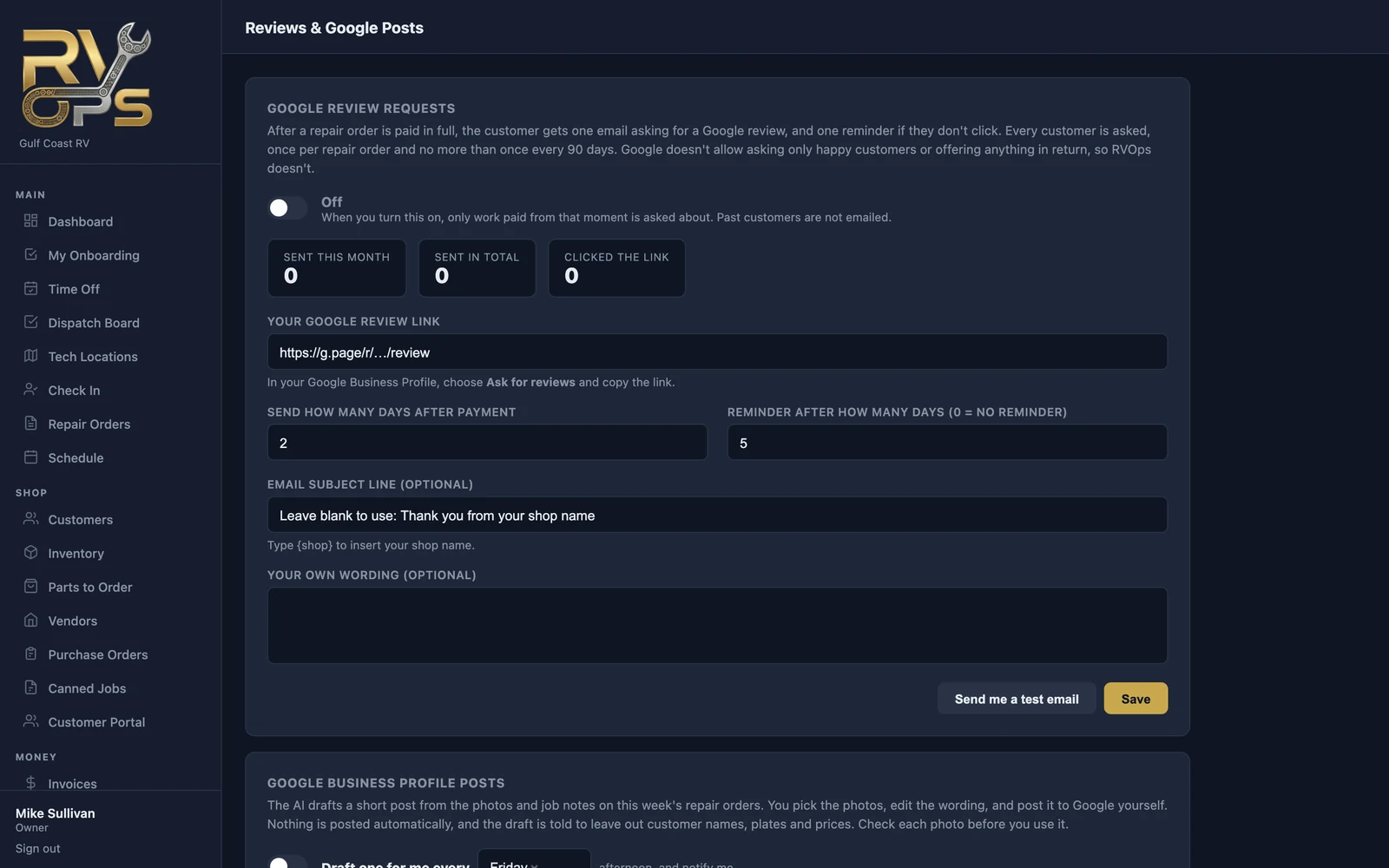
Turn it on
- In your Google Business Profile, choose Ask for reviews and copy your review link.
- In MarineOps, open Reviews & Posts and paste it into Your Google review link.
- Choose how many days after payment to send it, and whether to send one reminder.
- Optional: your own subject line and wording (type
{shop}for your shop name). - Click Send me a test email to see what customers get, then Save and switch it On.
How it works
- After a repair order is paid in full, the customer gets one email asking for a review, plus one reminder if they don't click.
- Each customer is asked once per repair order, and never more than once every 90 days.
- Only work paid after you turn it on is included — past customers aren't emailed.
- Everyone is asked. Google doesn't allow asking only happy customers or offering anything in return, so MarineOps doesn't.
The page shows how many requests went out this month, in total, and how many customers clicked through.
Still stuck? Send us a message (or email [email protected]) and tell us what you were trying to do — we answer within one business day.